
The "Purple Screen of Death" is the ultimate hype killer. You are watching a clutch moment, and suddenly—a 30-second unskippable ad cuts the feed.
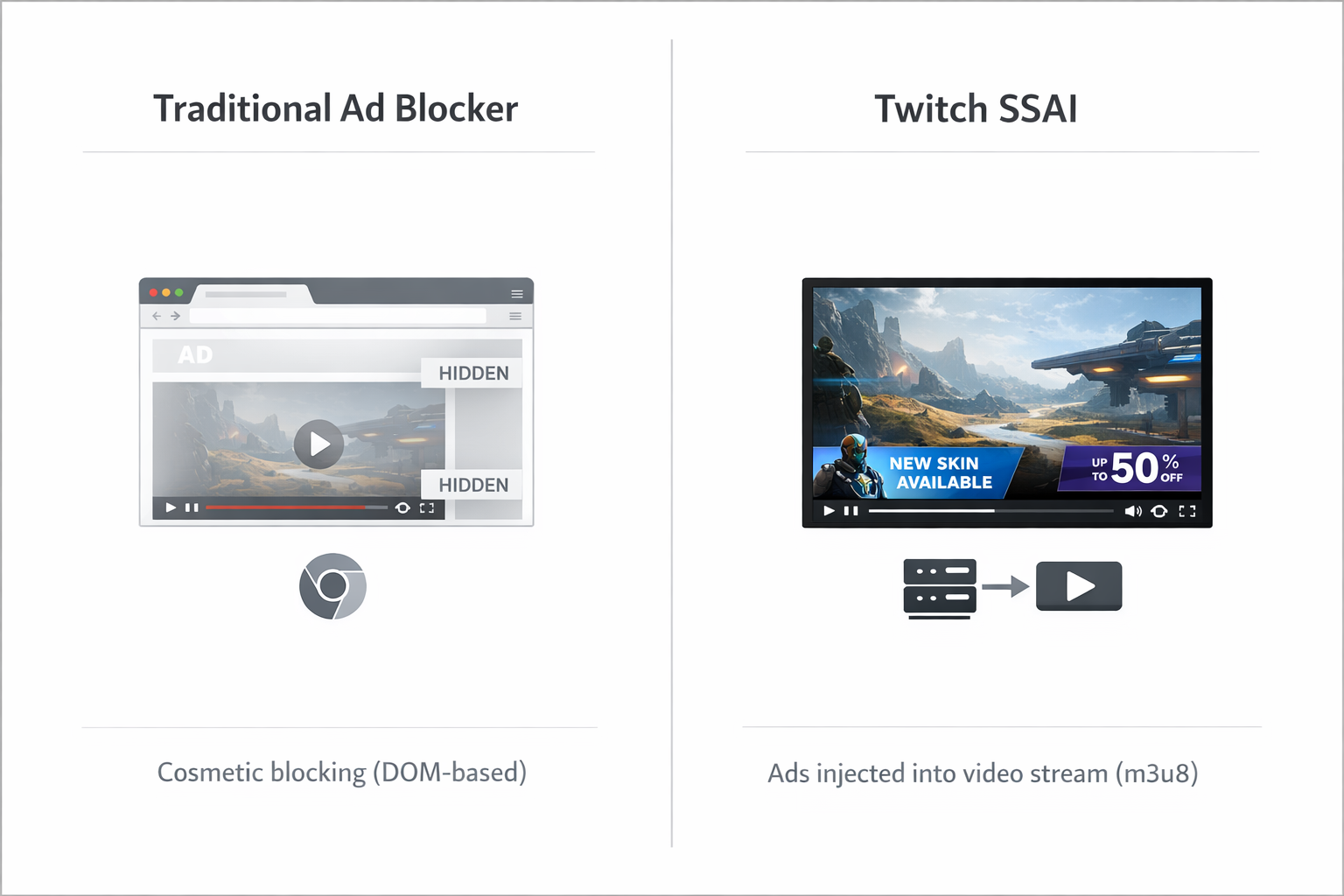
Traditional ad blocking is dead. Twitch now uses Server-Side Ad Injection (SSAI), weaving advertisements directly into the video stream (the m3u8 playlist) rather than pasting them on top. To a standard ad blocker, the commercial looks exactly like the gameplay.
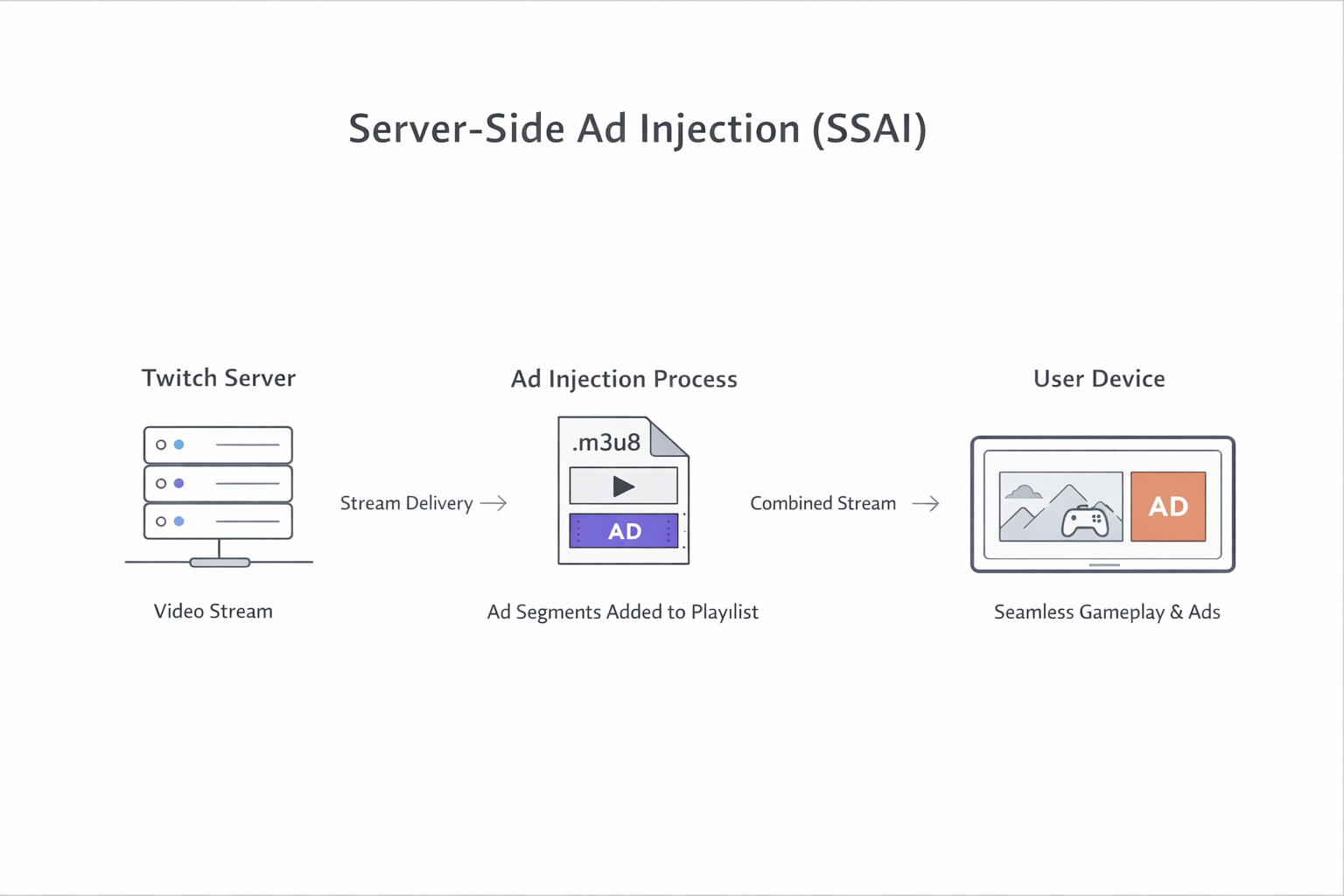
If you want to know how to block Twitch ads in 2026, you have to stop relying on cosmetic blocking and start blocking ads before they are injected into the stream. You need tools that can distinguish between Twitch’s content delivery requests and ad delivery requests and block the ad stream at the network level.
Here is the tactical guide to winning the war against SSAI.
Quick Answer: How to Block Twitch Ads
To remove ads from Twitch effectively in 2026, you must use methods that bypass Server-Side Ad Injection:
- Specialized Extensions: Use tools like Blockify or TTV LOL PRO, which block ads on Twitch streams.
- Script Injection: Use Tampermonkey with the
video-swap-newscript to replace ad segments with a lower-resolution stream. - External Players: Use Streamlink with VLC Media Player to bypass the Twitch web player entirely.
- Modified Clients: Use PurpleTV (Android) or TwitchAdBlock (iOS) for mobile viewing.
The Decision Matrix: Choose Your Weapon
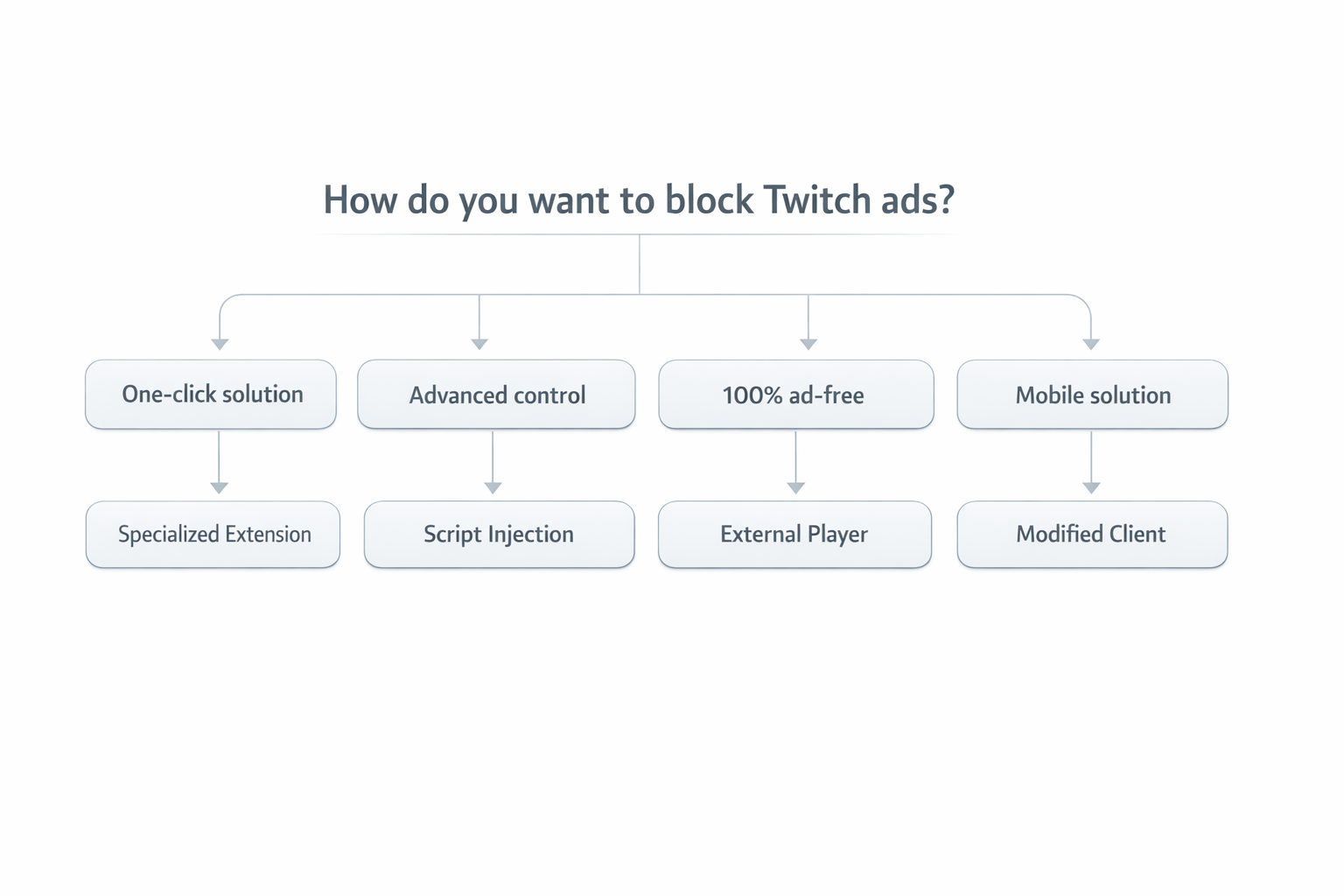
Don't have time to read the technical breakdown? Choose your method based on the effort required.
| Method | Tool | Friction | Risk | Best For |
|---|---|---|---|---|
| The Heavy Hitter | Blockify | Low | Zero | Stability. One-click solution that handles Audio & Video ads. |
| The Script | Tampermonkey | High | Medium | Control. Power users who don't mind updating code manually. |
| The Nuclear Option | Streamlink | Extreme | Zero | Zero-Compromise. 100% Ad-free, but requires a media player (VLC). |
1. The "Heavy-Duty" Twitch Adblocker: Blockify (Recommended)
Most tools fail because they look for visual elements to hide. Blockify is designed to block audio and video ads across platforms like Twitch, Spotify, and YouTube, providing uninterrupted streaming.
While standard blockers focus on hiding ad elements in the browser, Blockify blocks Twitch ads before they are injected into the stream. It prevents ad requests at the network level, so the ad never loads and the Twitch player never enters ad mode, making it one of the most reliable ad blockers for Twitch.
Why It Works:
- Manifest V3 Resilient: It functions effectively on Chrome even after the 2026 privacy architecture updates.
- Cross-Platform Value: It applies similar filtering to Spotify audio ads and YouTube.
- Set and Forget: No need to update scripts weekly.
Download Blockify here to silence ads on Twitch, Spotify, and YouTube.
2. The "Browser Segregation" Strategy: Firefox + Scripts
If you prefer a DIY approach, Chrome is no longer your friend. Google's new restrictions make deep script injection difficult. The strategy here is Browser Segregation: Install Firefox and use it strictly for Twitch.
The Toolchain:
- Browser: Firefox (or Brave).
- The Manager: Tampermonkey extension.
- The Payload:
Video Ad-Block for Twitch(VAFT) orvideo-swap-new.
How to Install:
- Go to the Pixeltris/TwitchAdSolutions GitHub repository.
- Find the
video-swap-newscript. - Click the "Raw" button; Tampermonkey will intercept and install it.
- Important: In the script settings, set the resolution to "480p" during ads. This swaps the high-res ad stream for a low-res content stream, preventing the purple screen.
The Trade-off: Twitch updates their player code constantly. You will likely need to manually update your script every few weeks when the "Purple Screen" returns.
3. The "Proxy" Method: TTV LOL PRO
This method doesn't technically "block" the ad. Instead, it tricks Twitch into thinking you are somewhere else.
How it Works:
When the player signals an ad break, the TTV LOL PRO extension routes your video traffic through a proxy server in a country where that specific ad campaign doesn't exist (e.g., Eastern Europe). Once the ad break is over, it routes you back to your normal connection.
The Warning:
- Privacy Risk: You are routing your traffic through a third-party server. However, the project is open source, allowing the community to audit the code for transparency and safety.
- Buffering: Public proxies get congested. If you experience lag, look for the "Custom Proxy URL" settings in the extension and find a private proxy server.
4. The "Nuclear Option": Streamlink + Chatterino
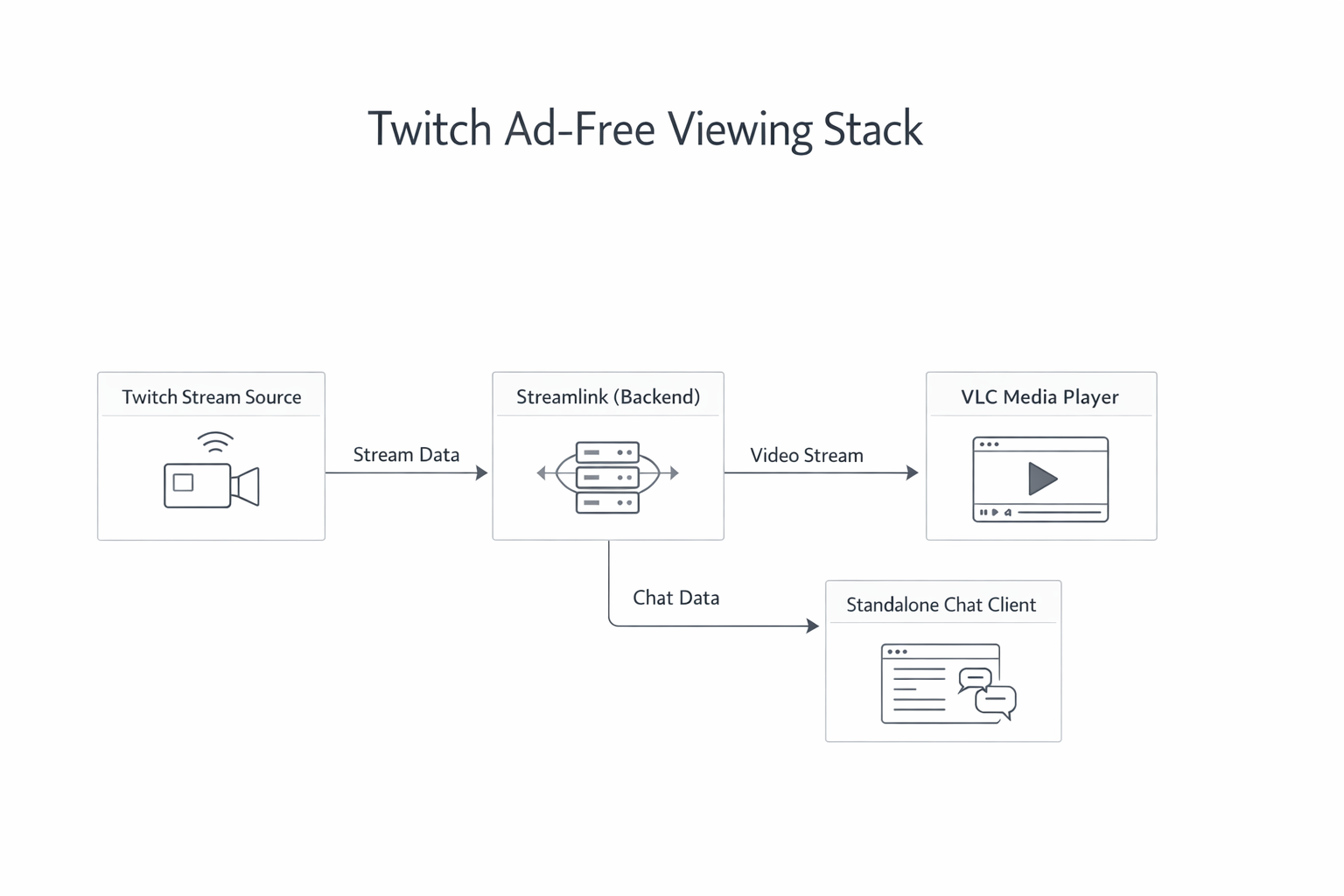
For power users who want no ads on Twitch guaranteed, you must bypass the website entirely. If you don't use their player, they can't force their player ads on you.
The Stack:
- Backend: Streamlink (Command Line Interface).
- Player: VLC Media Player (High quality, low CPU).
- Chat: Chatterino (Standalone chat client).
How to do it:
- Install Streamlink and VLC.
- Open your command prompt (CMD).
- Type:
streamlink twitch.tv/shroud best(replace "shroud" with your streamer). - VLC will launch the stream instantly, completely ad-free.
5. Mobile & TV Survival Guide
Blocking Twitch ads on desktop is easy compared to the walled gardens of mobile apps and smart TVs. Here is how to break out.
Android (Modded APKs)
Do not use the official app.
- The Solution: PurpleTV.
- The Method: Uninstall the official Twitch app. Download the PurpleTV
.apkfrom the official repository. - Safety Check: Only download from the developer's GitHub or Telegram. Never use random "Free APK" sites.
FireStick / Android TV
- The App: SmartTV Client for Twitch (Beta/Fork versions).
- Configuration: Go to settings and enable "Twitch 5" or "Beta Ad Solutions." This forces the client to use a proxy method similar to desktop tools.
iOS (iPhone & iPad)
Apple makes this difficult, but not impossible.
- The Fix: Sideloading via AltStore.
- The App: TwitchAdBlock or Frosty.
- The Friction: You must refresh the app signature every 7 days via a computer, or the app will stop opening.
FAQ: Troubleshooting the Ad-Block Experience
Why do I see a purple screen saying "Commercial Break in Progress"?
This is a placeholder. Twitch detected you blocked the ad segment but couldn't stitch the gameplay back together instantly. To fix this, use a "Video Swap" script (like the one mentioned in the Firefox section) which replaces the ad with a 480p version of the stream rather than a blank screen.
Does a VPN block Twitch ads?
Generally, no. Connecting to Germany or the USA will actually increase the number of ads you see. To use a VPN effectively, you must connect to a "Safe Harbor" country with low ad inventory, such as (due to sanctions blocking ad delivery) Ukraine, Russia, or Costa Rica. However, Twitch aggressively blocks VPN IP addresses, often leading to "Error 2000."
Is it illegal to block Twitch ads?
No. It is against Twitch's Terms of Service (ToS), meaning they could technically ban your account (though this is historically extremely rare), but it is not a legal crime to modify how your browser renders content.
Conclusion: Reclaim Your Viewing Experience
Twitch ads are aggressive, and the platform has the resources to constantly break simple blocking methods. The passive era of adblock for Twitch is over.
- For the tech-savvy: Firefox + Scripts offers high control.
- For the purist: Streamlink offers a perfect stream if you sacrifice the browser interface.
- For the user who just wants it to work: Blockify remains the superior choice.
Stop letting ads ruin the best moments of the stream. Get Blockify today and silence the interruptions for good.



Join the Discussion