

The internet isn't just broken; it was sabotaged. If you are hunting for the best ad blockers 2026 has to offer, you have likely noticed that the war has changed.
Google’s "Manifest V3" update didn’t just change the code; it cut the cables on the legacy tools we all grew up using. The era of the "one-click cure-all" is dead. If you want a clean web today, you need a strategy, not just a button.
We spent two weeks stress-testing 30 different ad-blocking tools against the new browser rules. We measured RAM drain, page breakage, ad-blocking efficacy, and unskippable ad injections to bring you the only three survivors worth installing.
Quick Summary: Top Ad Blockers for 2026
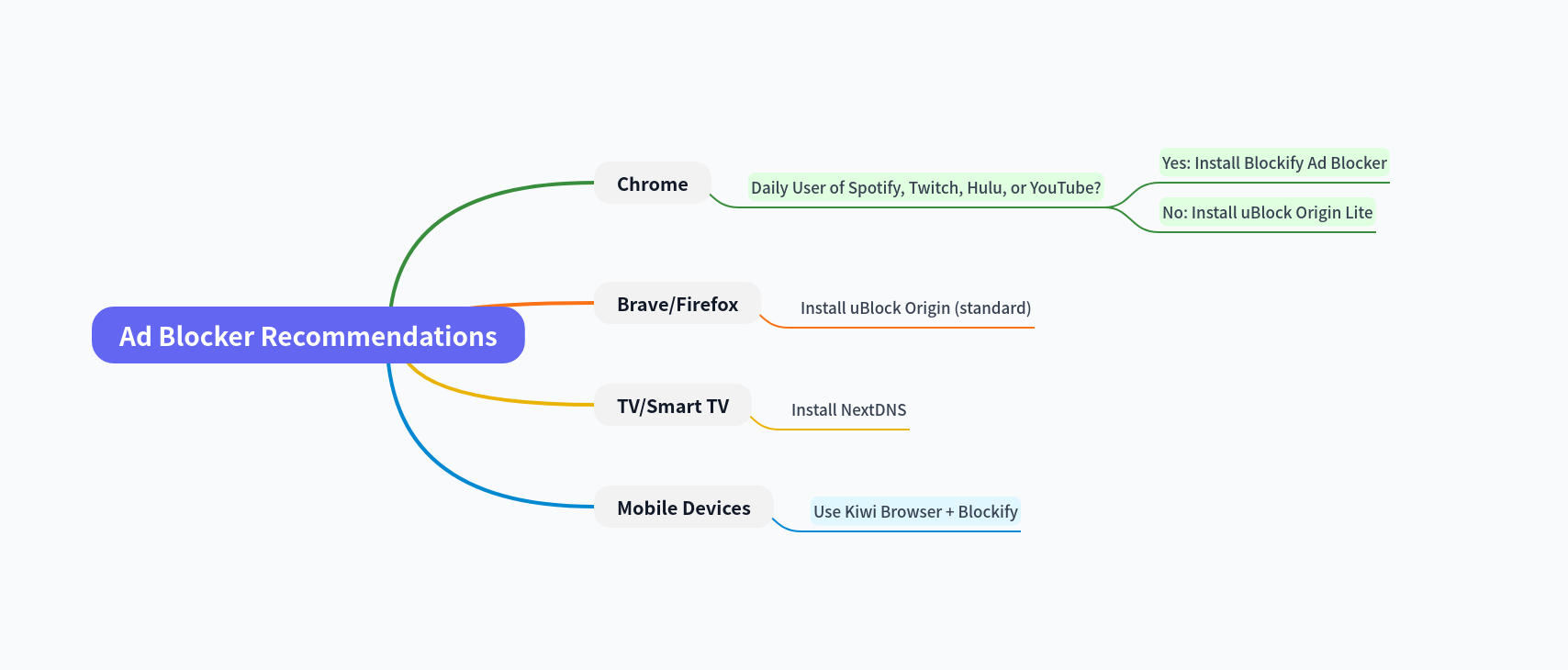
If you want the short answer, here is the optimal setup based on your browser:
- Best for Chrome Users:
uBlock Origin Lite. It is the only reliable ad blocker fully compatible with Google's new Manifest V3 engine.
- Best for Firefox/Brave:
uBlock Origin (Standard). The most powerful, unrestricted blocker for browsers that still respect user freedom.
- Best for Audio/Video Content:
Blockify. A specialized tool designed to scrub audio and video ad injections that standard ad blockers miss.
The "Cat and Mouse" Reality: Corporations vs. The Open Web
To understand why your current ad blocker feels like it’s failing, you have to look at the architecture. Google is an ad company. Chrome is their enforcer. For years, they tolerated ad blockers to gain market share. Now that they dominate the market, they are closing the gates.
The weapon they are using is Chrome Manifest V3 (MV3).
Google markets MV3 as a "security update." In reality, it is a bottleneck designed to suffocate modern ad blocking. It removes the ability for an extension to dynamically filter web traffic, replacing it with a limited list of pre-approved rules.
The Math Problem: 30k vs. 300k Filter Rules
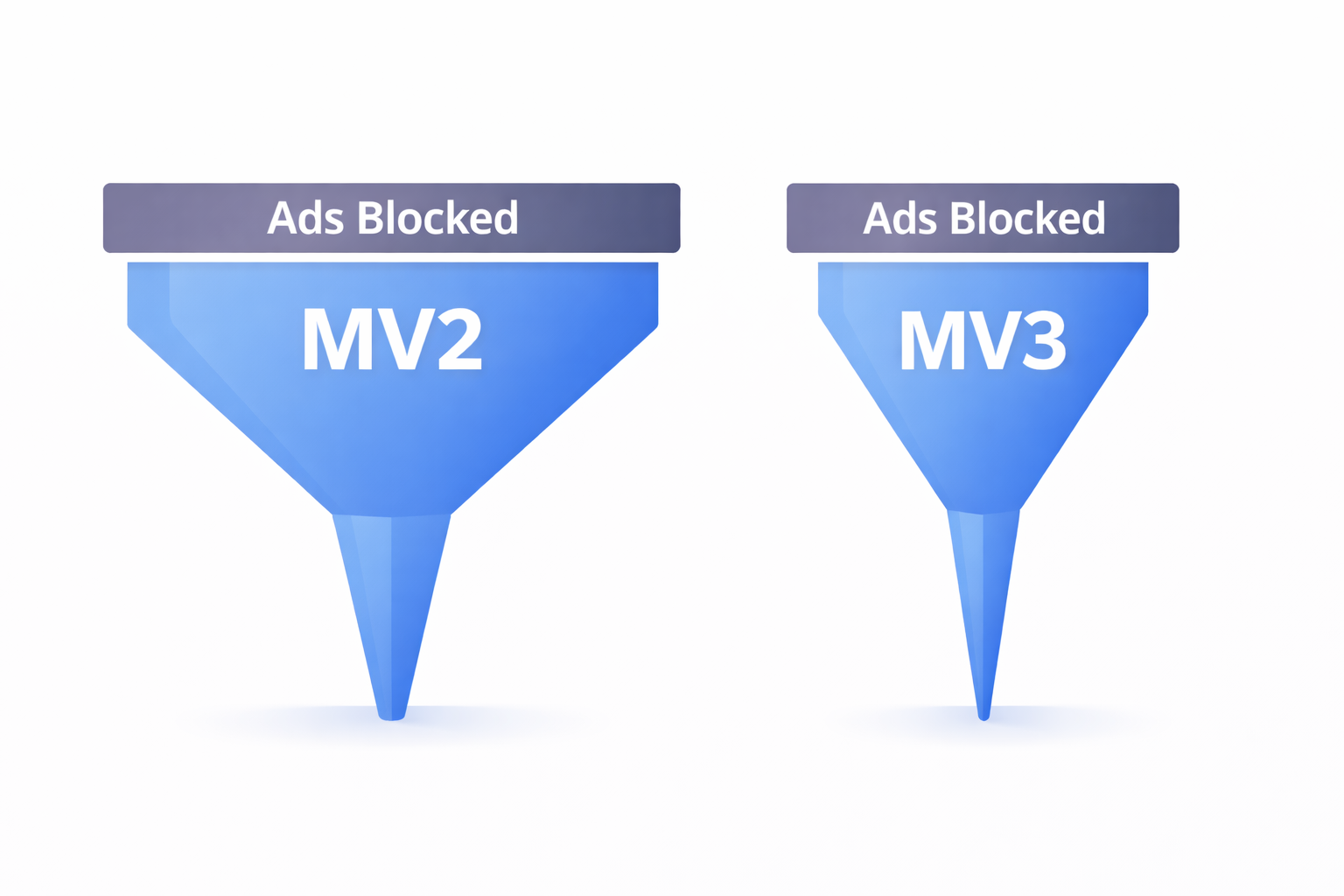
This isn't just a theory; it is hard math.
Effective ad blocking relies on dynamic filtering. When you visit a site, a tool like uBlock Origin (on the old Manifest V2 standard) scans code against massive, community-maintained blocklists.
- Ad Blockers using (old, depreciated) Manifest V2: These ad-blockers can process 300,000+ (no hard limit) dynamic filtering rules instantly. They adapt to new threats in real-time.
- Ad Blockers using (new, mandatory) Manifest V3: These ad-blockers are capped at roughly 30,000 rules per extension.
Chrome is effectively capping the intelligence of your ad blocker. If a new ad server pops up that isn't on the filter list, you see the ad. End of story.
What does that mean for you?
You have two paths forward:
- The Path of High Resistance: Switch to Firefox or Brave. These browsers continue to support powerful ad-blocking APIs and Manifest V2.
- The Path of High Convenience: Stay on Chrome, but accept that you must use uBlock Origin Lite or Blockify.
The Top 3 Ad Blockers in 2026 (Ranked by Use-Case)
Stop looking for one tool to rule them all. Think of this as a Toolkit. To get a truly ad-free internet in 2026, you likely need a solution based on your platform and use case.
1. The OG: uBlock Origin (Best for Firefox & Privacy Purists)

Let’s be clear: This is the Top Tier standard.
uBlock Origin (the original, not the Lite version) is open-source, lightweight, and refuses to sell out to corporate interests. It features "Dynamic Filtering," which allows you to manually zap elements on a page that annoy you.
The Caveat:
To use this weapon at 100% power, you must leave Google Chrome. Google has shackled this extension. If you want the full experience - where ads are stripped, trackers are blocked, and layouts remain pristine - you need to install this on Firefox or Brave.
- Pros: Open-source protection, customizable filtering excellence.
- Cons: Not available on Chrome anymore.
- Download: https://github.com/gorhill/uBlock
2. The Survivor: uBlock Origin Lite (Best for Chrome Users)

We get it. You have all your data (bookmarks, passwords, addresses) on Chrome, and you’re too lazy to switch browsers.
If you are staying in the Google ecosystem, uBlock Origin Lite (uBOL) is your survival pick.
Unlike legacy blockers that try to fight Chrome’s new rules (and often fail), uBOL complies with them, while keeping the browsing experience snappy.
The Trade-off:
It is incredibly fast and CPU-efficient, but it lacks the "Cosmetic" superpowers of its big brother. You might see the occasional empty white box where an ad used to be. It’s not perfect, but it’s the best protection Chrome will allow you to have.
- Pros: Fully Manifest V3 compliant, minimal impact on processing/memory.
- Cons: Cannot block advanced ad formats or "clean up" complex sites.
- Download: https://chromewebstore.google.com/detail/ublock-origin-lite/ddkjiahejlhfcafbddmgiahcphecmpfh
3. The Challenger: Blockify (Best for Blocking Audio/Video Ads)

Blockify shines where the general blockers fail.
You can have the best network blocker in the world, but if you listen to Spotify or watch Twitch streams, you are still going to get hit. Why? Because these platforms inject ads directly into the media stream or use server-side insertion that standard extensions can't "see."
Blockify is the specialist you call in for the heavy lifting. It works on all major content platforms, including YouTube.
- Ad-blocking on Spotify: If you listen to music while you work or listen to podcasts on Spotify, a standard banner or pop-up blocker isn't enough. Blockify scrubs the audio ads on Spotify entirely, ensuring your playlist never stops.
- Ad-blocking on Twitch: Twitch has been at war with ad blockers for years (the dreaded "Purple Screen of Death"). Blockify’s engine is specifically tuned to handle these video stream injections.
Ad-blocking on Hulu: Hulu’s mid-roll ads are tightly integrated into playback, so generic blockers often cause playback errors. Blockify cleanly skips past them, so episodes play straight through ads without breaking the stream.

Download:
Get Blockify for Chrome
Get Blockify for Edge
Ranking Criteria: How We Tested
We didn't just read the product page copy. To make our list of top ad blockers, a tool had to pass 4 tests:
- Ad-Blocking Efficacy: Does it pass the toughest ad-blocking benchmarks and tests?
- Real-world tests on all major platforms: How well does the ad blocker perform on popular websites and platforms, like YouTube, Spotify, Twitch, Hulu, Prime Video, Disney, etc? Is the ad blocker able to effectively remove hard-to-remove formats, like audio and video ads?
- Resource Drain: Does it eat your RAM and CPU, or does it run efficiently?
- The "Sellout" Test: Is it owned by an ad-tech company? If yes, that’s a red flag.
The "False Prophets": Ad Blockers to Avoid
Part of being a rebel is knowing who the real enemy is. It’s not just the advertisers; it’s the fake "protectors."
If you have Total Adblock, delete it now.
Total Adblock is not designed to protect your privacy; it is designed to monetize it.
- Aggressive Upselling: They work for 7 days and then slam you with a "Premium" paywall to keep blocking.
Resource Hogs: We didn’t just read the marketing copy; we tested them rigorously. We ran these tools on a standard laptop with 16 GB of RAM. Our performance tests showed Total Adblock using significantly more RAM and CPU compared to better ad blockers like Blockify.
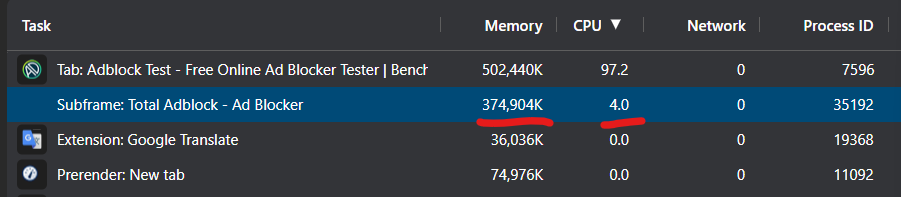
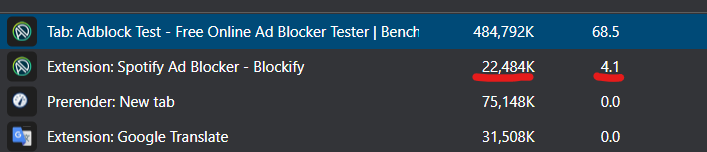
For a more comprehensive performance comparison of various ad blockers, check out detailed performance reports by Debugbear:
- https://www.debugbear.com/chrome-extension-performance-lookup?search=AdGuard+Adblocker
- https://www.debugbear.com/chrome-extension-performance-lookup?search=Blockify
- https://www.debugbear.com/chrome-extension-performance-lookup?search=uBlock+Origin
Privacy & ad-blocking: Beyond the Browser
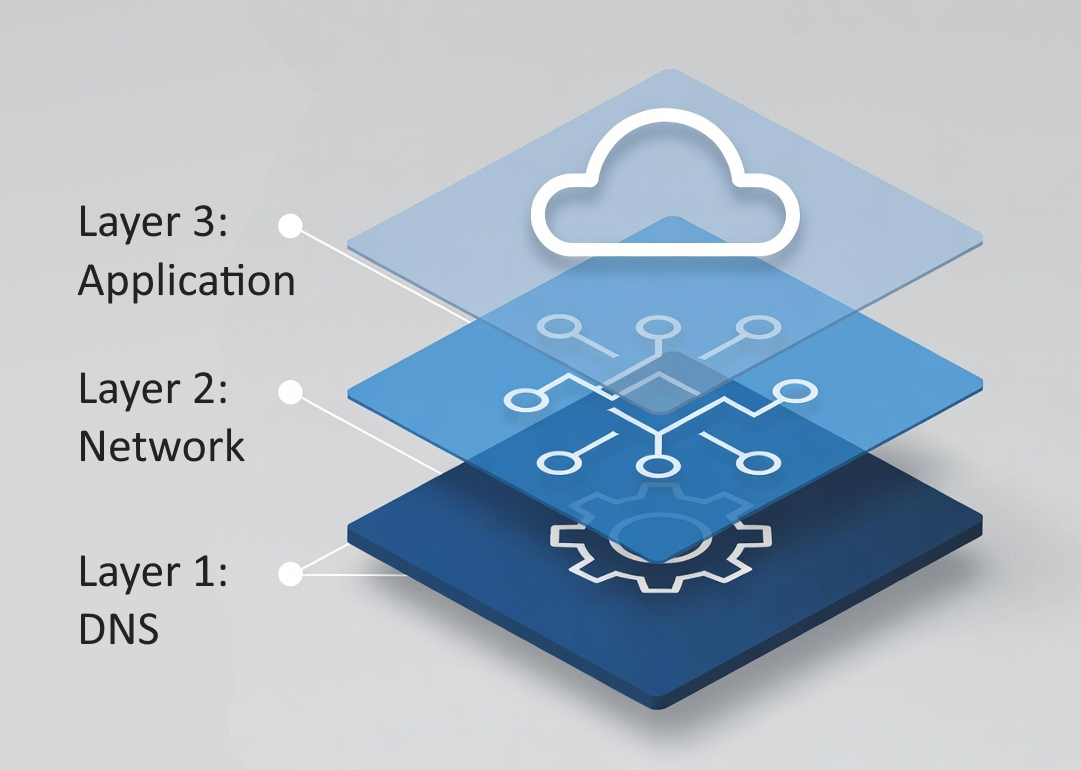
If you are serious about privacy, you need to look at the devices that don't have browsers. Your Smart TV, your thermostat, and your Roku are phoning home constantly.
DNS Filtering (NextDNS/Pi-hole)
You can't install an Ad Blocker on a Samsung TV. But you can change the TV's DNS settings.
- The Concept: DNS Sinkholing. When your TV tries to load an ad from ads.samsung.com, a DNS filter like NextDNS or Pi-Hole sees the request and returns "0.0.0.0" (a dead end). The ad never downloads.
- The Setup: It takes 5 minutes to configure on your router. Once done, every device on your Wi-Fi is protected.
Note: DNS-based ad-blocking only works for simple type of ad injections. For more stubborn ad formats, an advanced Ad Blocker like Blockify is required.
Frequently Asked Questions
Why does YouTube still show ads with an ad blocker?
It’s a war of attrition. YouTube updates its script; your blocker updates its algorithm. If an ad slips through, don't uninstall the tool. Wait for an update. This refreshes the ammunition against YouTube's tactics.
Is it safe to use two ad blockers at once?
Generally? No. Running AdBlock Plus and uBlock Origin together is like having two antivirus programs fighting over the same resources. This can slow down your system. The Exception: You can and should stack uBlock Origin Lite (for general browsing) with Blockify (for media). Because Blockify specifically targets audio/video/streaming ads that uBOL fails to remove, they cover each other's blind spots.
Do Ad Blockers work on iPhone or Android devices?
Browser extensions generally don't work on mobile browsers or apps (like the YouTube app or Candy Crush). Some mobile browsers (like Kiwi or Edge mobile browser) do support extensions. Alternatively, you can use a DNS solution like NextDNS. It blocks ads at the network level before they reach your phone.
Verdict: Which "Ecosystem" Are You In?
There is no "One Tool" anymore. There is only the right setup for your habits.
- The Chrome Loyalist: Download uBlock Origin Lite or Blockify. Blockify is best for audio and video ads, while uBOL is lightweight and snappy.
- The Privacy Purist: Switch to Firefox/Brave, and install uBlock Origin.
- The Media Junkie: Regardless of your browser, add Blockify to your stack to handle Spotify, Twitch, Hulu, and YouTube streams without the headache.
Don't settle for broken pages or content interruptions.
The best ad blockers of 2026 are ready to help you reclaim your time and attention - today!




Join the Discussion